
The route on the map
The full track for the chosen period on the map, with stops numbered in order.
Choose a vehicle and a period and see the full route on the map, with numbered stops and the detail of every point: time, status, speed and odometer.
Sample data
Route history answers everyday questions in seconds: where a vehicle went, how long it was stopped and what time it reached each place.
The full track for the chosen period on the map, with stops numbered in order.
Time, vehicle status, speed and odometer at every point on the route.
See at a glance where and for how long each vehicle stopped.
Export the route to attach it to a report, settle a claim or review it with the driver.
Available in the Veosat platform, from each vehicle's page.
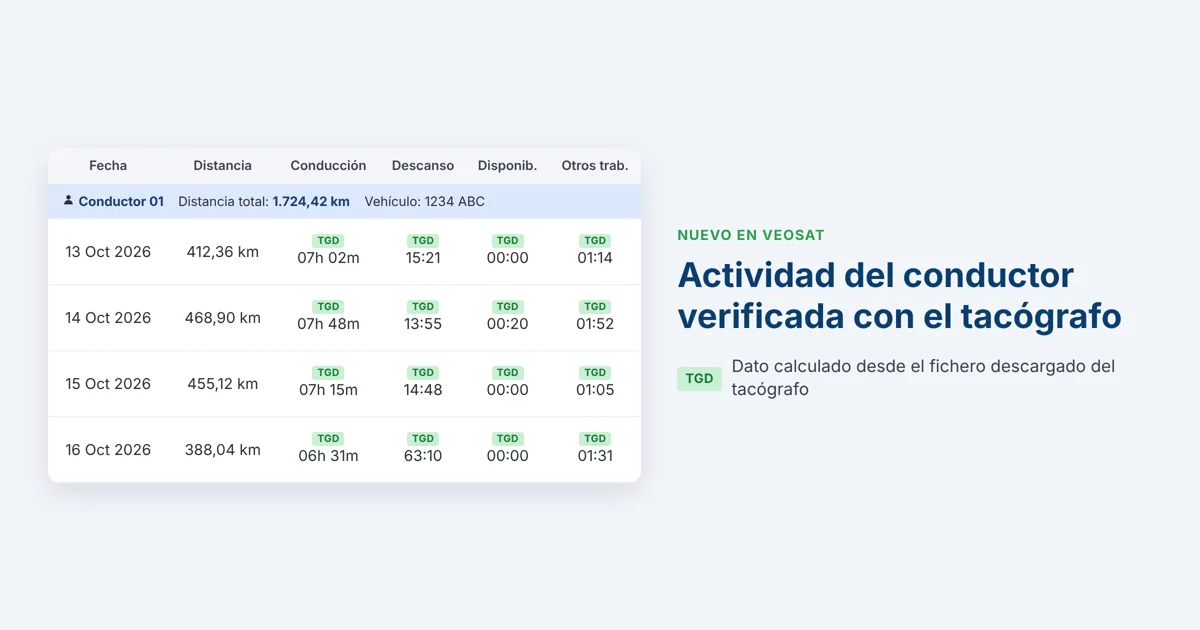
Driving, rest and kilometres taken from the official file, marked with the TGD label.
See what's new →Sample data
A 0–100 score for every driver based on the vehicle's CAN/FMS data, to cut fuel use, wear and risk.
See what's new →Sample data
When each vehicle enters and leaves your customers' sites, works, bases or warehouses, and how long it stays.
See what's new →Ask for more information and we will show you with your own vehicles.
Or by phone: 93 497 61 78

